Schema 101 for Small Business Owners: How to Help AI Understand Your Website
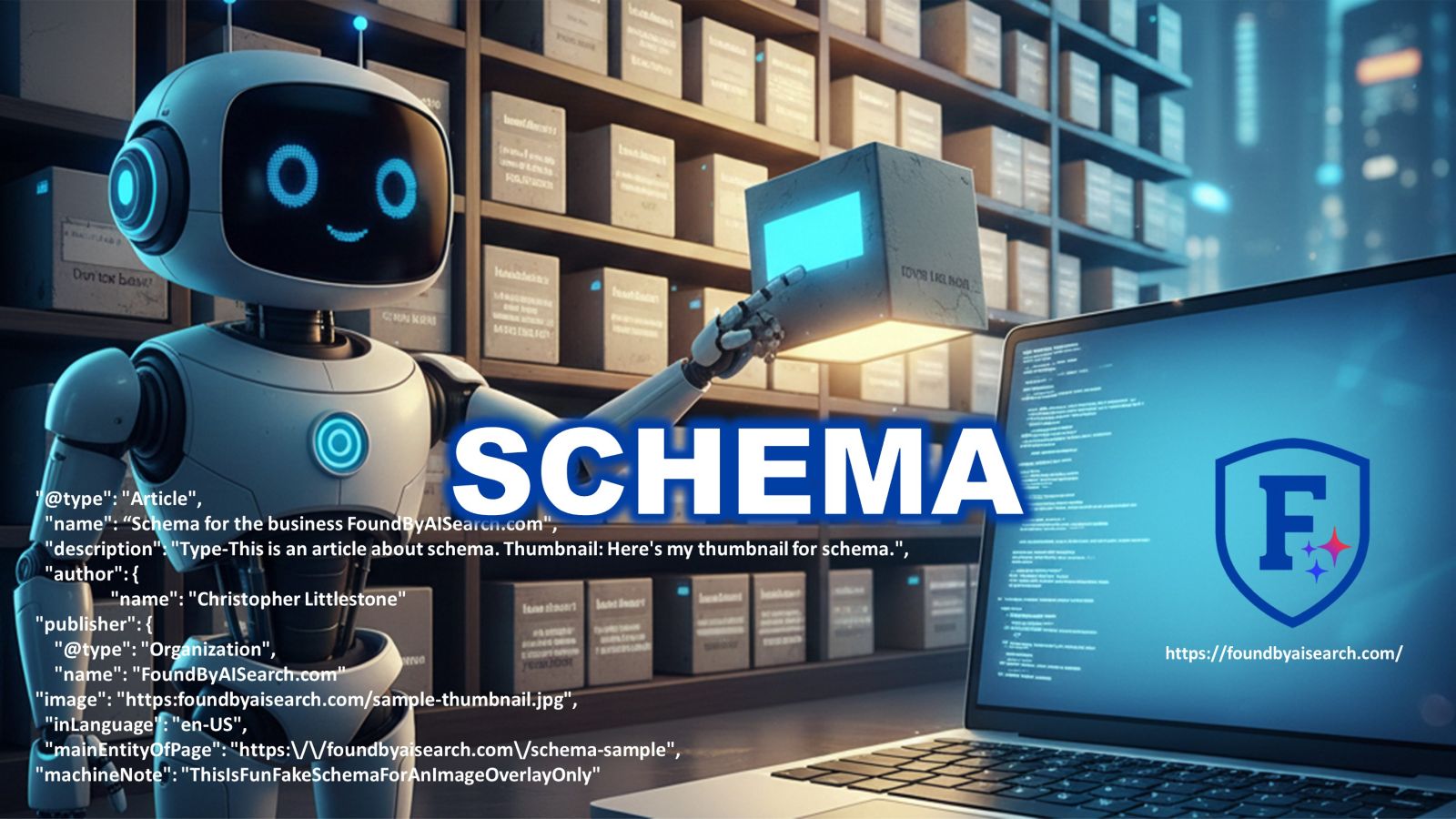
Imagine an AI assistant is standing in front of a shelf full of businesses, trying to pick the one that fits a customer’s question. Your website might be great, but if the “label on your box” is missing or messy, the AI will quietly move on to someone else. That “label” is schema, and most small businesses either don’t use it at all—or use it badly.
This article is your simple, thorough, small-business-friendly guide to schema: what it is, why it matters, and exactly how to use it to be found by AI search.
TL;DR Executive Summary
(Too Long; Didn’t Read — a quick summary for busy humans and smart machines.)
- Schema is a special kind of code that explains your business to machines (AI search, Google, voice assistants).
- Without schema, AI has to “guess” who you are, what you do, and who you serve. With schema, it knows.
- The most important schema types for small businesses are: Organization / LocalBusiness, Website, Service or Product, FAQ, Article, and Review.
- Good schema makes it easier for AI assistants to recommend your business in answers, summaries, and local results.
- You don’t need to be a developer. You can use plugins, page builders, or simple copy-and-paste steps.
- A small business that uses clear schema can outrank larger competitors who ignore it.
- This article walks you through what to add, how to add it, and how to avoid common mistakes, plus gives you checklists and examples.
Why Schema Matters More Than Ever
Search is changing fast. AI assistants and AI search engines no longer show a long list of blue links. Instead, they give direct answers, summaries, and recommendations.
When those systems decide which business to recommend, they look for:
- Clear structure
- Consistent facts
- Strong trust signals
- Helpful content
Schema helps you deliver all of that in a language machines understand.
I didn’t learn this in a classroom. I learned it the hard way—building multiple websites, growing a YouTube channel to more than 45 million views and 379,000+ subscribers, and then seeing what actually moved the needle in search. When I cleaned up the schema and structure on my own sites, I saw 4x organic traffic within about 60 days.
The lesson was simple:
When you make your business easy for machines to understand, they make it easier for customers to find you.
What Is Schema (In Plain Language)?
Schema is just structured data. It’s a small piece of code (usually JSON-LD) that you place on your site to describe things like:
- Your business name, address, and phone number
- Your services or products
- Your opening hours
- Your reviews
- Your articles and FAQs
Think of schema as the ID card for your business. Humans can read your homepage. Machines prefer schema.
How Schema Talks to Machines
You don’t see schema on the page, but AI and search engines do. They scan it for:
- Who you are (“@type”: “LocalBusiness” or “@type”: “Organization”)
- Where you are (“address” and “geo”)
- What you offer (“serviceType”, “offers”)
- Why you can be trusted (“aggregateRating”, “review”)
It’s like filling out a very detailed profile form—but in code.
Why Schema Matters in an AI Search World
AI assistants don’t have time to guess, so here’s a quick look at what AI sees before you add schema markup:
| Feature | Without Schema (Before) | With Schema (After) |
| Business Type | “Maybe a dentist?” | Clearly identified as “LocalBusiness > Dentist” |
| Location | “Somewhere in town” | Exact address with geo coordinates |
| Services | “Mentioned in text” | Cleanly listed and structured in schema |
| Reviews | “Scattered on site” | Organized ratings with a clear review count |
| Trust Level | Low | High |
Schema turns uncertainty into clarity — and clarity is what AI recommends.
A Simple Traffic Example
This is what can happen when you clean up your schema and structure (numbers are rounded for simplicity):
Example: Organic Clicks After Schema Fixes
Month | Organic Clicks
——–|—————-
Jan | 500
Feb | 520
Mar | 2,000 <- schema and structure improved
Apr | 2,150
May | 2,300
The content didn’t radically change. The clarity did.
The Most Important Schema Types for Small Businesses
There are many schema types, but you don’t need them all. Focus on the essentials that help AI understand your business, content, and trust signals.
Organization / Local Business Schema
This is your core “business profile” for machines. It should include:
- Business name (exactly as you use it everywhere)
- Address (consistent with Google Business Profile)
- Phone number and email
- Website URL
- Opening hours
- SameAs links (to your main profiles like Google Business, LinkedIn, etc.)
Example (simplified Local Business schema):
{
“@context”: “https://schema.org”,
“@type”: “LocalBusiness”,
“name”: “Example Town Dental Care”,
“url”: “https://www.exampletowndental.com”,
“telephone”: “+1-555-123-4567”,
“address”: {
“@type”: “PostalAddress”,
“streetAddress”: “123 Main Street”,
“addressLocality”: “Example Town”,
“addressRegion”: “TX”,
“postalCode”: “75001”,
“addressCountry”: “US”.
“openingHours”: “Mo-Fr 09:00-17:00”
}
Website and Breadcrumb Schema
Website schema tells AI “this is the main website and its search function.”
BreadcrumbList schema explains how your pages fit together.
This helps AI understand your site’s structure, which is useful when it pulls answers from multiple pages.
Service / Product Schema
If you sell a service (like consulting, coaching, repairs) or a product (like a course, book, or physical item), adding schema for these helps AI:
- Match your offer to specific search intent
- Show prices, descriptions, and availability
- Understand which pages are “money pages”
Example (simplified Service schema):
{
“@context”: “https://schema.org”,
“@type”: “Service”,
“name”: “Local SEO and Schema Setup”,
“provider”: {
“@type”: “Organization”,
“name”: “Example Marketing Studio”
“areaServed”: “Dallas, Texas”,
description”: “Done-for-you schema and local SEO optimization for small businesses.,
“offers”: {
“@type”: “Offer”,
“priceCurrency”: “USD”,
“price”: “497.00”
}
FAQ Schema
FAQ schema turns common questions on your page into structured Q&A data.
Why this matters:
- AI assistants love clear question-and-answer formats.
- It tells machines exactly what questions you answer for customers.
- It can be reused in AI answers even when users never visit your page directly.
Example (simplified FAQ schema):
{
“@context”: “https://schema.org”,
“@type”: “FAQPage”,
“mainEntity”: [
“@type”: “Question”,
“name”: “Do I need schema for my small business website?”,
“acceptedAnswer”: {
“@type”: “Answer”,
“text”: “Yes, schema helps AI and search engines understand your business so they can recommend you more confidently.”
}
Article / BlogPosting Schema
Every major blog article that you want AI to see as a helpful resource should include Article or BlogPosting schema:
- Headline
- Description
- Author
- Date published / modified
- Main image
- URL
This helps AI connect your thought leadership content to your business expertise.
Bad Example vs. Good Example
Let’s look at a simple comparison.
Bad Example: “Invisible” Local Bakery
“Sweet Treats Bakery” has:
- A basic homepage with some photos
- A menu in a PDF
- No clear address on the page
- No schema at all
From a human point of view, it’s fine. From an AI point of view, it looks like this:
– Not sure if this is a restaurant, shop, or blog
– Location is unclear
– Opening hours not obvious
– Services (custom cakes, catering, etc.) are buried in text
– No reviews in structured form
Good Example: AI-Friendly Local Bakery
Now compare this to “Sweet Treats Bakery” after basic schema and clarity updates:
- Clear name, address, and phone number on every page
- LocalBusiness schema with address, geo, opening hours
- Service schema for “Wedding Cakes” and “Corporate Catering”
- FAQ schema answering common questions
- Article schema on their “How to Choose a Wedding Cake” guide
For AI, it now looks like this:
– LocalBusiness: Bakery
– Location: 123 Main Street, Example Town
– Services: Wedding cakes, birthday cakes, corporate catering
– Service Area: 25 miles around Example Town
– Reviews: 4.8/5 from 217 customers
– Helpful content: Guides and FAQs on cakes and events
Here’s a simple comparison chart:
Bad Website vs. Good Website for AI Search
| Feature | Bad Site | Good Site |
| Clear business type | ❌ | ✅ |
| Consistent name + address | ❌ | ✅ |
| LocalBusiness schema | ❌ | ✅ |
| Service / Product schema | ❌ | ✅ |
| FAQ schema | ❌ | ✅ |
| Article schema on key posts | ❌ | ✅ |
| Ready for AI recommendations | Low | High |
You don’t have to be perfect. You just need to be clearer than your competitors.
Step-by-Step: How to Add Schema Without Being a Developer
You don’t need to write code from scratch. Here’s a simple, practical process you can follow.
Step 1: Decide Your Primary Entity
Ask yourself: “If AI could only understand one thing about my business, what would it be?”
For most small businesses, the primary entity is:
- “@type”: “LocalBusiness” if you serve a local area
- “@type”: “Organization” if you are more global or online only
Pick one, and make that schema your foundation.
Step 2: Collect Your Core Facts
Before touching any tools, gather this information:
- Exact business name
- Address and service area
- Phone and email
- Website URL
- Main services or products
- Opening hours
- Social profiles you want to connect
Put it all in a simple document. This becomes your schema source of truth.
Step 3: Choose Your Implementation Method
Depending on your setup, you can:
- Use a WordPress schema plugin
- Many plugins let you fill in fields and generate JSON-LD for you.
- Use your page builder or theme
- Some themes and builders allow you to set site-wide business details and output schema automatically.
- Paste schema manually using a code block
- You can generate schema using an online schema generator, then paste it into the <head> or a code widget.
If you’re using Elementor, for example, you might use:
- A site settings area for basic business info
- HTML widgets on key pages to paste JSON-LD
Pick the method that feels simplest for you.
Step 4: Build and Test Your Schema
After you’ve implemented your schema, test it using a structured data testing tool (Google and other services provide them).
When you test, look for:
- Errors (broken code or missing required fields)
- Warnings (optional fields you might want to add)
- Whether the tool correctly identifies your business type, services, and FAQs
If something looks wrong, go back, fix the data, and test again.
Step 5: Keep It Updated
Schema is not “set it and forget it.” Update it when you:
- Move locations
- Change your business name
- Add or remove key services
- Get a big jump in reviews or ratings
- Publish important new articles or guides
Think of schema as your public profile for machines. Keep it current.
A Simple Schema Checklist for AI Visibility
Use this quick checklist as you work through your site:
Schema Visibility Checklist
- I have Organization or LocalBusiness schema set up.
- My name, address, and phone are consistent across the web.
- My primary services or products are described in schema.
- My main articles or guides use Article or BlogPosting schema.
- I have at least one FAQ section with FAQ schema.
- My reviews and ratings are represented in structured data.
- My schema passes basic testing with no major errors.
- My most important pages each have a clear role such as home, service, product, or article.
- I review my schema at least every six to twelve months.
If you can check most of these boxes, you’re already ahead of many competitors.
How I Handle Schema on This Website (Yoast + Custom Schema)
On this website, I use Yoast SEO as the baseline. Yoast automatically handles core schema for things like:
- The WebSite entity (your overall site and search function)
- The Organization / Person entity (who is behind the content)
- Basic Article / BlogPosting data for posts (headline, description, author, dates)
- BreadcrumbList schema for navigation (if breadcrumbs are enabled)
That gives me a strong foundation without having to hand-code everything.
For more advanced control—especially for capstone articles like this—here’s the simple workflow I use:
- I finish writing and formatting the article in WordPress.
- I copy the final URL and the full article text.
- I send a prompt to my AI assistant that looks like this:
Here is the URL: [INSERT URL HERE]
Here is the article:
[INSERT ARTICLE HERE]
Please write for me the complete JSON-LD schema for this page,
including Article and FAQ schema, that I can cut and paste into an
HTML container at the bottom of this web page.
- I take the JSON-LD schema the AI generates and paste it into an HTML widget at the bottom of the page in Elementor.
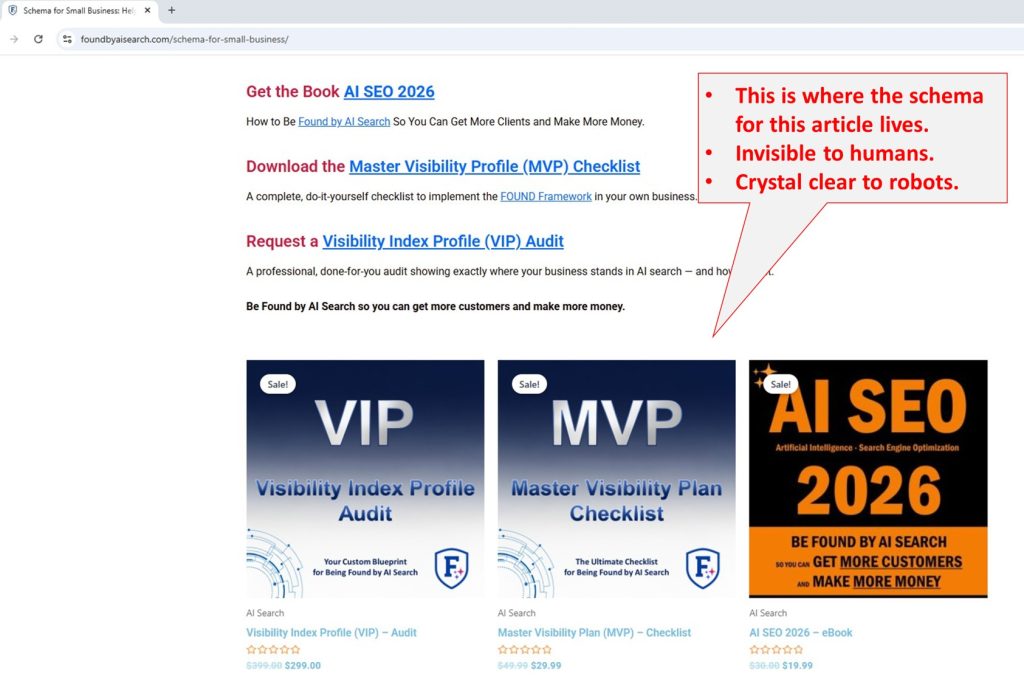
From the front end, your visitors see nothing extra. The page looks completely normal.
What the browser shows to humans:
But on the back end, it looks more like this:
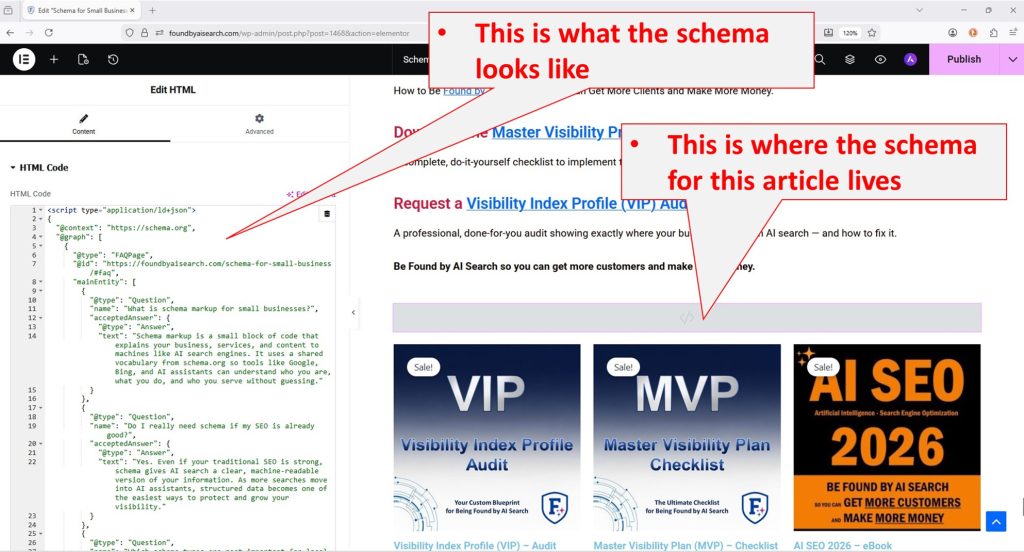
That is what the robot sees in the background. To search engines and AI systems, it’s a rich, structured data feed that explains exactly what this page is about.
And that’s what helps you get free (organic) traffic—because the robots (AI) clearly understand what you offer, what you know, and who you serve, so they can confidently recommend you and your business to people searching for your services or expertise.
Frequently Asked Questions About Schema for Small Businesses
What is schema markup for small businesses?
Schema markup is a small block of code that explains your business, services, and content to machines like AI search engines. It uses a shared vocabulary (schema.org) so tools like Google, Bing, and AI assistants can understand who you are, what you do, and who you serve—without guessing.
Do I really need schema if my SEO is already good?
Yes. Even if your traditional SEO is strong, schema gives AI search a clear, machine-readable version of your information. As more searches move into AI assistants, structured data becomes one of the easiest ways to protect and grow your visibility.
Which schema types are most important for local businesses?
For most local businesses, the key types are:
- LocalBusiness or Organization (core profile)
- Service or Product (what you offer)
- FAQPage (common questions and answers)
- Article / BlogPosting (helpful guides and resources)
- Review / AggregateRating (trust signals)
If you get these right, you’ve covered most of what AI needs.
How do I add schema in WordPress without coding?
You can:
- Use a schema plugin and fill in fields for your business, services, and FAQs.
- Use a theme or page builder that supports schema in its settings.
- Generate schema with a tool, then paste it into an HTML or code widget on your page.
You don’t need to write JSON-LD from scratch.
Can bad schema hurt my SEO or AI visibility?
Yes, bad schema can cause problems. If your schema is incorrect, misleading, or full of errors, search engines may ignore it—or trust you less. That’s why testing your schema and keeping it accurate is important. Honest, consistent data always wins.
How long does it take for schema to have an impact?
It depends on how often your site is crawled, but many sites see changes in:
- Indexing and understanding within a few days to a few weeks
- Click-through rates and impressions within a few weeks to a few months
Think of schema as part of a long-term visibility strategy, not a one-day trick.
Do I need a developer to implement schema?
Not always. Many small business owners can do the basics themselves using:
- Plugins
- Generators
- Page builders
You might want a developer or consultant if your site is complex, but for most local businesses, you can handle the essentials with a good guide and a bit of patience.
What’s the difference between schema, structured data, and rich results?
- Schema / schema markup is the code you add (usually JSON-LD).
- Structured data is the concept of organizing your data in a consistent, machine-readable way.
- Rich results (or rich snippets) are the enhanced displays (stars, FAQs, etc.) that search engines may show based on your structured data.
You add schema → it becomes structured data → search engines may reward you with rich results.
How often should I update my schema?
At a minimum, review your schema every 6–12 months, or whenever you:
- Change your business name
- Move locations
- Add or remove major services
- Get a significant change in reviews or ratings
- Publish important new evergreen articles
Your schema should always match your current, real-world business.
How does schema help AI assistants like ChatGPT or voice assistants recommend my business?
AI assistants rely on structured, trustworthy data. Schema gives them:
- A clear definition of who you are
- Exact details about your location and services
- Simple, machine-readable answers to common questions
When an AI system has to pick one or two businesses to recommend, strong schema increases your chances of being the one it trusts.
Key Takeaways
- Schema is the structure that helps AI search and assistants truly understand your business.
- You don’t need every schema type—focus on Organization / LocalBusiness, Service or Product, FAQ, Article, and Review.
- Clear, consistent basic facts (name, address, phone, hours) are more important than clever tricks.
- A small business with strong schema and clear signals can beat a larger business with weak or missing schema.
- Think of schema as your machine-readable profile—it should always match your real-world business.
- Testing and updating your schema regularly keeps your AI visibility sharp.
- Schema is not just “SEO decoration.” It’s one of the clearest ways to show AI that your business is trustworthy and helpful.
Final Thoughts: Make Your Business Easy for AI to Recommend
In the new world of AI search, you can’t afford to be vague. Machines will recommend the businesses they understand the best.
Schema is how you step forward, raise your hand, and say, “Here’s exactly who we are, what we do, and who we serve.” When your facts are clear and your structure is strong, AI can confidently point customers in your direction—often before they ever see a traditional search result.
Ready to Be Found by AI Search?
If you’re serious about AI visibility, your next step isn’t another article — it’s understanding how AI systems currently see your business.
Request a Visibility Index Profile (VIP) Audit
Most businesses are already invisible to AI search. The VIP Audit is a professional, done-for-you analysis that shows how AI systems like ChatGPT, Gemini and Bing understand your brand, what’s holding you back, and what to fix first. You get a clear, prioritized roadmap in two business days or less. No guessing. Just clarity.
Be Found by AI Search so you can get more customers and make more money.
-
AI Search
Visibility Index Profile (VIP) – Audit
Original price was: $399.00.$299.00Current price is: $299.00. Add to cart -
AI Search
Master Visibility Plan (MVP) – Checklist
Original price was: $49.99.$29.99Current price is: $29.99. Add to cart -
AI Search
AI SEO 2026 – eBook
Original price was: $30.00.$19.99Current price is: $19.99. Add to cart